


































How to Choose a Mobile Desk: Size, Stability, and Wheels
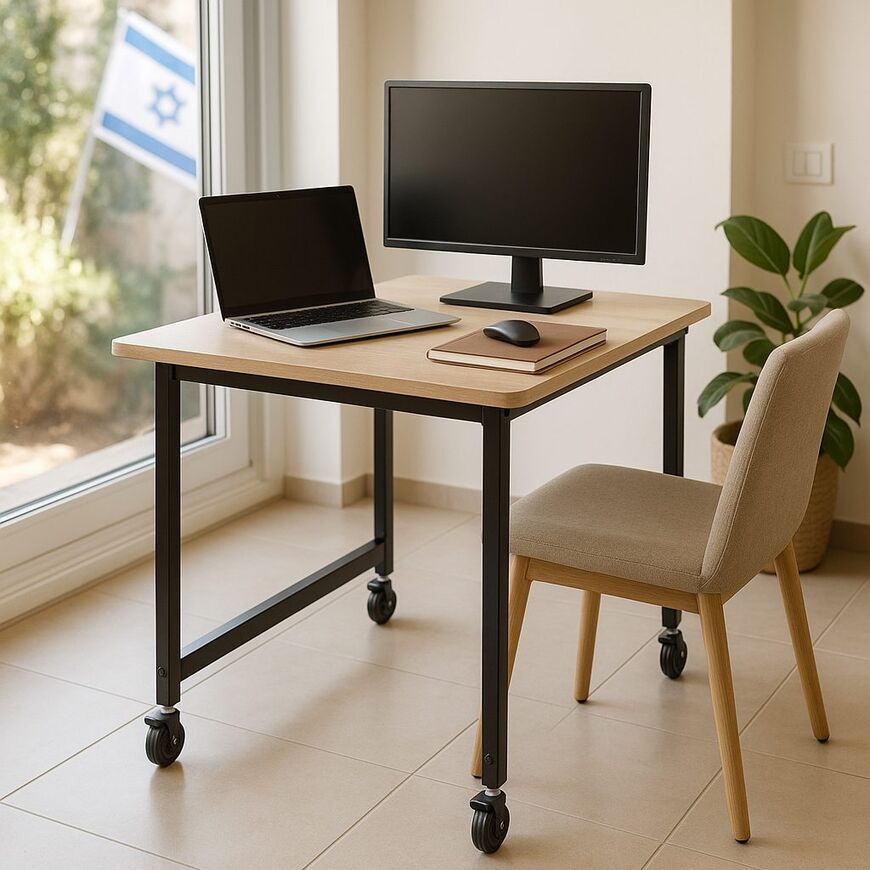
This guide is about a desk on wheels, not a folding desk that can be stored away when it is not in use. Before buying, check whether the desk will fit where you plan to use it, remain stable while you work, and have wheels suited to your floors and the route through your home. If it will usually stay in one place, check whether the wheels can be locked.
Consider what you’ll keep on the desktop and how often you’ll need to move the desk. Check its dimensions and desktop height, the maximum weight capacity listed by the manufacturer, and the wheel and brake design. A desk with wheels is not necessarily height-adjustable; these are separate features, so check whether the model offers both.
Check the space where the desk will go and the route it will take
Measure the width of the space where you plan to place the desk, and make sure there is room around it to move. The product dimensions describe the desk itself, not the space needed to move it into position, take it out, or walk past it. A model may fit in your workspace but still get in the way if it blocks a passage or leaves too little room to maneuver.
Look for the desk dimensions and the dimensions of its base and wheels in the specifications, as these affect how much floor space it occupies. You can mark out its footprint on the floor and see how it fits in the room with the furniture in place. The word “compact” may refer only to the desktop, so be sure to check the base dimensions too.
If you plan to move the desk between rooms, check the width of the doorways and passageways along the route. Rugs, thresholds, and furniture can make it harder to move, even if the wheels are suitable for the floor itself. Make sure there is enough room to turn the desk and move it without hitting furniture.
Assess the room as it will be when you use the desk, not when it is empty. If important dimensions are missing from the specifications, ask the seller to confirm them before you buy. This can help you avoid a situation where the desk fits into the room but is difficult to position or move out.
Make sure the desk works with your chair and equipment
Sit in the chair you normally use and check whether the desk height feels comfortable. When typing, your shoulders should be relaxed and your arms should rest comfortably without reaching forward. There is no single height that suits everyone, so compare the desktop height with your chair and your usual sitting posture.
Think about which items you’ll use on the desktop at the same time: a laptop, mouse, notebook, monitor, or cup. A laptop on its own takes up less room than a laptop used with a mouse or other equipment. Arrange your items on another surface to estimate how much space you’ll need, and make sure the mouse won’t be pushed too close to the edge.
Also check what is underneath the desktop and between the parts of the base. Legs, a frame, or a shelf may prevent your chair from getting close, even if the desktop is wide enough. Make sure there is room for your legs and that the chair can slide up to the desk without hitting the base.
A folding desk is not necessarily a desk on wheels, so it is not a direct substitute if you want to move the desk from place to place without folding it. Examples of folding desks include the Foldable Transformer Table for a Laptop, Tablet, and Other Uses—Large and Convenient, with a Fan and the Large, Convenient Foldable Wooden Laptop Desk. Check the product details to make sure the desk suits your intended use.
Wheels do not change the desk height
Wheels let you move a desk from place to place, but they do not adjust the desktop height. Height adjustment requires a separate mechanism, and not every desk on wheels has one. Likewise, a height-adjustable desk is not necessarily equipped with wheels.
If changing the height is important to you, make sure this feature is listed in the specifications and find out how the adjustment works. If you plan to move the desk between rooms, check that its dimensions and wheels are suitable for the passageways in your home. Mobility alone does not mean the desktop height can be adjusted.
Check the desk’s weight capacity and stability
The maximum weight capacity is the load that the manufacturer says the desk can support. Add up the weight of the equipment you’ll keep on it while working, such as a computer and monitor, and compare the total with the specification. If you don’t know the weight of an item, look up the manufacturer’s information or weigh it. If the weight limit or its suitability for your needs is unclear, ask the seller for clarification before buying.
Being able to support the stated load does not guarantee that the desk will remain steady while you type. Product photos and descriptions can help you understand the leg and joint design, but they may not be enough to assess stability. Look for detailed information from the manufacturer or, if possible, inspect the model in a store. Place equipment of a similar weight to yours on the desk and try typing or writing. Check whether the desktop wobbles, the monitor shakes, or the desk shifts.
Where you place your equipment can also affect how stable the desk feels. Distribute items across the desktop, and if the wheels have brakes, engage them and check that the desk stays in place. Testing the desk’s stability and brakes is more useful than relying on the maximum weight capacity alone.
Choose wheels and brakes to suit your floor
Easy movement and stability while working are two separate features. Brakes can help limit desk movement, but the locking mechanism varies by model and also depends on the floor and how you use the desk. Check whether brakes are included and which wheels they lock.
If you’re shopping in person, engage the brakes and gently try to push the desk. When shopping online, look for an explanation in the specifications or product description of where the brakes are located and how to use them. A photo may show their location, but it cannot tell you how stable the desk will be while you work.
Consider the route you’ll take when moving the desk. Thick rugs, thresholds, and transitions between different types of flooring can make it harder to roll. If the manufacturer specifies which surfaces the wheels are suitable for, rely on that information rather than their appearance. Make sure the route is clear and wide enough.
- Make sure you can move the desk into and out of position easily.
- Find out how many wheels lock and whether the brakes are easy to reach.
- Assess the desk’s stability using the specifications or by testing it in a store—not from photos alone.
- Take the flooring, rugs, and thresholds along the route into account.
If you plan to move the desk between rooms often, check the manufacturer’s instructions about moving it with equipment on the desktop. If there are no clear instructions, clear the desktop before moving the desk to prevent items from falling.
What to check before choosing a model
Before placing your order, review the main details and compare them with your needs:
- Dimensions: Make sure the desk fits both the intended space and the route you’ll use to move it.
- Work setup: Check that the desktop height, chair clearance, and space for your equipment suit the way you work.
- Weight capacity and stability: Compare the weight of your equipment with the manufacturer’s limit, and find out how you can assess the desk’s stability.
- Wheels and brakes: Check that they suit your floor and that the wheels can be locked while you work.
- Missing details: Ask the seller for clarification if an important specification is not provided.
Measurements to take before comparing models
To choose a model that will work in practice, measure the space where you plan to work and map out the route you’ll use to move the desk: the width of the passageways, doorways, and any obstacles along the way. Make a list of the items you’ll keep on the desk, such as a laptop, monitor, mouse, and notebook. This will help you compare each model’s dimensions with your space and equipment instead of relying on a photo or the word “compact.”
The desktop’s overall dimensions do not necessarily show how much usable workspace it offers. Check whether you can arrange your equipment comfortably and leave room for your mouse and notebook without items sticking out over the edge. A good fit also means being able to sit close enough to the desk, with adequate room for your legs and chair. The U.S. Occupational Safety and Health Administration’s computer workstation guide highlights the connection between the work surface, equipment placement, and legroom.
There is no single desk height or depth that works for everyone. Check the desktop height in relation to your chair and working posture, and compare the dimensions with your computer, equipment, and available space. If possible, compare the model’s specifications with your existing furniture or measure the height at which you feel comfortable working. A mobile desk can also serve as a permanent workstation, but if you plan to use it that way, pay special attention to whether it remains stable and comfortable when left in one place for extended periods.
Stability, wheels, and brakes
To assess stability, check the desk in the place where you plan to use it. Does the desktop wobble? Does the frame look securely connected? Does a light press on a corner make the desk move noticeably? If you can test the model in a store, try typing or writing on it with the wheels locked. Movement during everyday tasks can be distracting, even if the desk seems stable when empty.
Wheels let you move the desk, but they do not lock it in place by themselves. Check how to engage the brakes and whether they keep the desk from rolling during use. Don’t assume that having brakes guarantees the entire desk will be stable: after locking the wheels, gently try to move the desk and make sure it stays in place. If securing the desk is important to you, check which wheels lock and whether you can reach the brakes when the desk is next to a wall or piece of furniture.
Wheel suitability depends on the floor and route. Check the specifications or ask the seller which surfaces the wheels are designed for, and consider whether the route includes rugs, thresholds, or narrow passageways. Wheels that roll well on a smooth floor may behave differently on a rug or uneven surface, so how often you’ll move the desk and the route you plan to use are important considerations. A compact desk may be easier to maneuver, but if the desktop is too small for your equipment, mobility will not make up for the lack of space.
Weight capacity and the difference between mobile and adjustable
Check the weight capacity stated by the manufacturer for the specific model and compare it with the weight of the equipment you’ll place on the desk, including a monitor and other items. Do not judge the desk’s capacity by its appearance or the size of its legs. For example, the IKEA Israel product page for the MITTZON model lists a 66 × 50 cm desktop and a maximum load of 10 kg. These specifications apply to that model only; they are not a standard or recommendation for all mobile desks.
The term “mobile desk” generally means that the desk can be moved, usually on wheels; it does not guarantee that its height is adjustable. If you need height adjustment, make sure it is explicitly listed in the model’s specifications. When following the guidance in How to Choose a Mobile Desk: Tips for a Convenient, High-Quality Purchase, compare the desktop dimensions, weight capacity, height-adjustment options, brakes, and stability separately. Information about fixed desks or standing desks does not replace checking the wheels and locking mechanism on the specific mobile model.


